> ## Documentation Index
> Fetch the complete documentation index at: https://docs.sacra.com/llms.txt
> Use this file to discover all available pages before exploring further.
# Building with LLMs & AI agents
> Connect Sacra's MCP server to Claude, ChatGPT, or your own agent and walk through how tools chain together to answer real questions
Sacra's [MCP server](/mcp-overview) lets AI agents call Sacra tools directly inside a conversation. This guide walks through connecting to the server, understanding the available tools, and seeing how an agent chains them together to answer a real question like "What's Kraken's latest revenue?"
## Connect to Sacra MCP
There are three ways to connect. Pick whichever fits your setup — the tools and data are the same regardless of client.
### Claude
1. Open the official [Sacra connector in the Claude directory](https://claude.ai/directory/connectors/sacra) and click **Connect**.
2. Sign in to Sacra and accept permissions.
### ChatGPT
1. Open the official [Sacra app in ChatGPT](https://chatgpt.com/plugins/plugin_asdk_app_6994e1a4aa408191846109195ecfa307) and add it to your account.
2. Sign in to Sacra and click **Allow**.
### Server-side (any agent SDK)
Connect from your own backend with a Sacra API key. This example uses the OpenAI Agents SDK, but any SDK that supports Streamable HTTP MCP works.
```ts theme={null}
import { MCPServerStreamableHttp } from "@openai/agents";
const mcpServer = new MCPServerStreamableHttp({
name: "sacra_research_tools",
url: "https://mcp.sacra.com/mcp",
requestInit: {
headers: {
Authorization: `Token ${process.env.SACRA_API_KEY}`,
},
},
});
```
Create an API key in your [Organization Settings](https://sacra.com/orgs/settings/general/). See the [server-side MCP page](/mcp-server-side) for a full working example.
Never expose your API key in client-side code. For server-side integrations, store it in a secure environment variable or secret manager.
***
## Available tools
The MCP server exposes eight tools:
| Tool | Description | Key parameters |
| -------------------------------- | ------------------------------------------------------------------ | --------------------- |
| `search` | Full-text search across Sacra's documents and companies | `query` |
| `get_all_company_domains` | Returns every company Sacra tracks with their domains | — |
| `get_company_profile` | Fetches a company's full profile (financials, datasets, documents) | `company_domain` |
| `get_revenue_signals` | Citation-backed revenue metrics from Sacra Signals Revenue | `company_domain` |
| `get_funding_rounds_for_company` | Lists funding rounds for a company | `company_domain` |
| `get_news_for_company` | Recent news items about a company | `company_domain` |
| `get_document_content` | Returns the full text of a Sacra document | `document_slug_or_id` |
| `get_category_items` | Returns related companies and documents for a category | `category_slug` |
Most workflows start with `search` or `get_all_company_domains` to find the right entity, then drill in with `get_company_profile`, `get_revenue_signals`, or `get_funding_rounds_for_company` depending on what you need.
***
## Walkthrough: "What's Kraken's latest revenue?"
Here's what happens when you ask this question in Claude, ChatGPT, or through a programmatic agent. The tool chain is the same regardless of client — only the UI around it differs.
### Step 1: The agent resolves the company
The agent needs to find Kraken in Sacra's database. It calls `get_company_profile`:
```json theme={null}
{
"tool": "get_company_profile",
"parameters": { "company_domain": "kraken.com" }
}
```
This returns the full company object including `financials`, `company_datasets`, `documents`, and metadata. The `financials` array contains headline numbers:
```json theme={null}
{
"financials": [
{ "name": "latest_estimated_revenue", "value": 2204000000, "date": "2025-12-31" },
{ "name": "latest_estimated_valuation", "value": 20000000000, "date": "2025-11-19" },
{ "name": "total_estimated_funding", "value": 832000000, "date": "2025-11-19" }
]
}
```
For a simple "latest revenue" question, the agent can answer directly from `financials`: **\$2.2B as of year-end 2025**.
### Step 2 (optional): The agent gets more detail
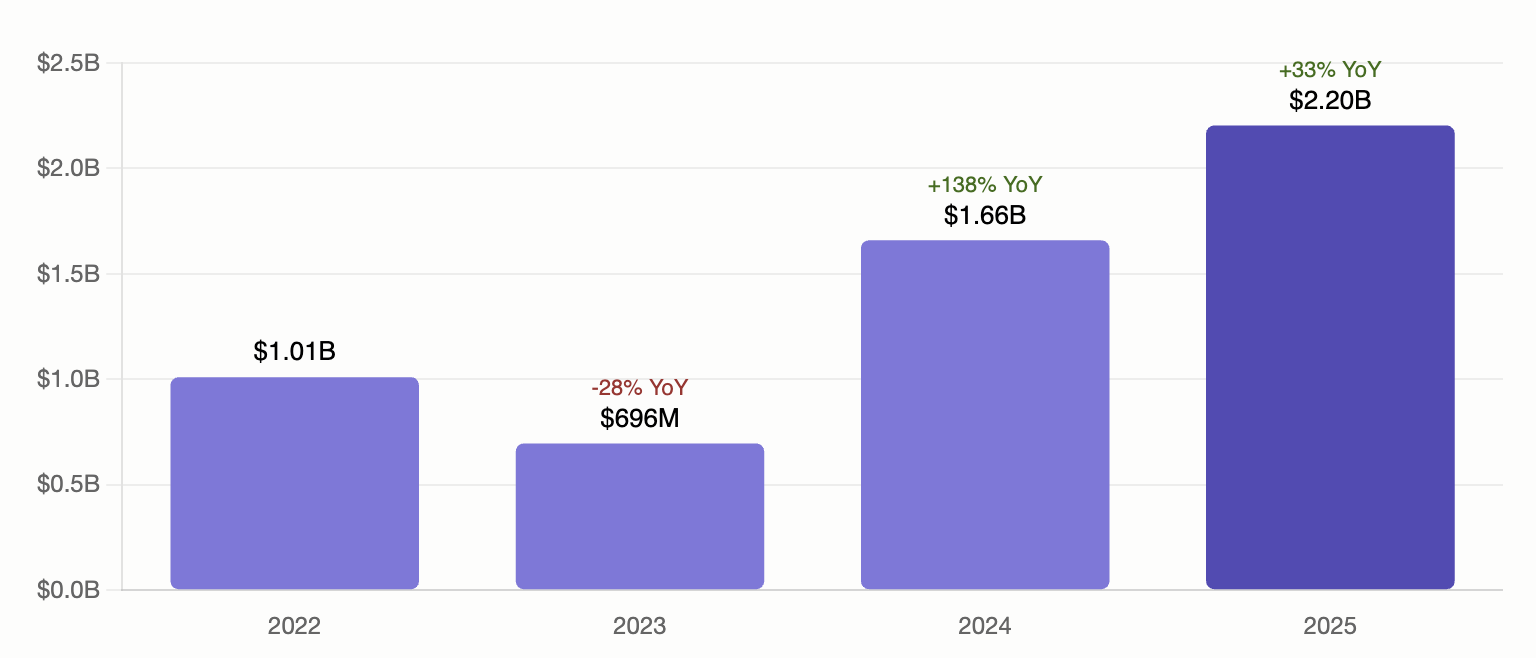
If you ask a follow-up like "How has that changed over time?" or if the agent wants to provide more context, it already has the `company_datasets` array from the same profile response. The revenue dataset gives the full time series:
```json theme={null}
{
"data_type": "Revenue",
"data": [
{ "x": "2022-12-31T00:00:00.000Z", "y": 1010000000, "type": "historical" },
{ "x": "2023-12-31T00:00:00.000Z", "y": 696300000, "type": "historical" },
{ "x": "2024-12-31T00:00:00.000Z", "y": 1658800000, "type": "historical" },
{ "x": "2025-12-31T00:00:00.000Z", "y": 2204000000, "type": "historical" }
]
}
```
The agent can now plot the change from $1.01B in 2022 to $2.2B in 2025.
 ### Step 3 (optional): The agent gets citation-backed metrics
If you want sourced data, the agent calls `get_revenue_signals`:
```json theme={null}
{
"tool": "get_revenue_signals",
"parameters": { "company_domain": "kraken.com" }
}
```
This returns granular metric observations with citations — URLs and quotes backing each revenue figure. The agent can include these in its response so you know exactly where each number comes from.
The agent decides which tools to call based on your question. A simple "What's the revenue?" may only need `get_company_profile`. Asking "What's the sourced revenue with citations?" will trigger `get_revenue_signals` as well.
***
## Walkthrough: "Write me a brief on Kraken"
A broader question like this triggers a multi-tool chain. Here's a typical sequence:
### 1. Company profile
```json theme={null}
{ "tool": "get_company_profile", "parameters": { "company_domain": "kraken.com" } }
```
The agent gets the full profile: description, founding year, key people, headquarters, financials, datasets, categories, and a list of Sacra documents about Kraken.
### 2. Funding rounds
```json theme={null}
{ "tool": "get_funding_rounds_for_company", "parameters": { "company_domain": "kraken.com" } }
```
Returns each round with dates, amounts raised, valuations, and round types — Seed in 2013, Series A in 2014, through to the Series C and Growth rounds in 2025.
### 3. Recent news
```json theme={null}
{ "tool": "get_news_for_company", "parameters": { "company_domain": "kraken.com" } }
```
Returns recent news items so the brief includes current developments.
### 4. Deep-dive into a document
The company profile includes a `documents` array. If the agent spots a relevant report — say "Kraken at \$1.5B up 128% YoY" — it can pull the full text:
```json theme={null}
{ "tool": "get_document_content", "parameters": { "slug": "kraken-at-1-5b-up-128-yoy" } }
```
This gives the agent detailed analysis to draw from when writing the brief.
### The result
The agent composes all four tool responses into a structured brief: business overview, key people, funding history, revenue trajectory, recent developments, and an investor takeaway — all grounded in Sacra data.
***
## Tips for effective prompting
### Activating the connector
In **ChatGPT**, say "Use Sacra" to ensure ChatGPT routes your question through the Sacra connector. In **Claude**, the connector activates automatically when your question matches the tool descriptions, but you can say "Use the Sacra MCP" to be explicit.
### Be specific about what you want
The more specific your question, the more targeted the tool chain:
| Prompt | Tools the agent typically calls |
| ----------------------------------------- | ---------------------------------------------------------------------------------------------------------- |
| "What's Kraken's revenue?" | `get_company_profile` |
| "What's Kraken's revenue with sources?" | `get_company_profile` → `get_revenue_signals` |
| "Write a brief on Kraken" | `get_company_profile` → `get_funding_rounds_for_company` → `get_news_for_company` → `get_document_content` |
| "What crypto exchanges does Sacra cover?" | `get_category_items` with `crypto-exchange` |
| "Find companies related to stablecoins" | `search` |
### Chain follow-up questions
After an initial question, the agent retains context. You can follow up naturally:
* "Now compare that to Coinbase"
* "What funding rounds led to that valuation?"
* "Pull the full report on their revenue growth"
Each follow-up triggers additional tool calls without needing to re-fetch earlier data.
### Ask for sources
If you want to know where a number comes from, ask explicitly: "What's Kraken's revenue and where does that number come from?" This prompts the agent to call `get_revenue_signals` for citation-backed data.
***
## Next steps
* **Build your own charts** from the dataset data: [Working with datasets & revenue data](/guides/working-with-datasets)
* **Build a programmatic agent** with the OpenAI Agents SDK: [Server-side Agents / SDKs](/mcp-server-side)
* **Explore the full API** for direct endpoint access: [API Reference](/api-reference)
### Step 3 (optional): The agent gets citation-backed metrics
If you want sourced data, the agent calls `get_revenue_signals`:
```json theme={null}
{
"tool": "get_revenue_signals",
"parameters": { "company_domain": "kraken.com" }
}
```
This returns granular metric observations with citations — URLs and quotes backing each revenue figure. The agent can include these in its response so you know exactly where each number comes from.
The agent decides which tools to call based on your question. A simple "What's the revenue?" may only need `get_company_profile`. Asking "What's the sourced revenue with citations?" will trigger `get_revenue_signals` as well.
***
## Walkthrough: "Write me a brief on Kraken"
A broader question like this triggers a multi-tool chain. Here's a typical sequence:
### 1. Company profile
```json theme={null}
{ "tool": "get_company_profile", "parameters": { "company_domain": "kraken.com" } }
```
The agent gets the full profile: description, founding year, key people, headquarters, financials, datasets, categories, and a list of Sacra documents about Kraken.
### 2. Funding rounds
```json theme={null}
{ "tool": "get_funding_rounds_for_company", "parameters": { "company_domain": "kraken.com" } }
```
Returns each round with dates, amounts raised, valuations, and round types — Seed in 2013, Series A in 2014, through to the Series C and Growth rounds in 2025.
### 3. Recent news
```json theme={null}
{ "tool": "get_news_for_company", "parameters": { "company_domain": "kraken.com" } }
```
Returns recent news items so the brief includes current developments.
### 4. Deep-dive into a document
The company profile includes a `documents` array. If the agent spots a relevant report — say "Kraken at \$1.5B up 128% YoY" — it can pull the full text:
```json theme={null}
{ "tool": "get_document_content", "parameters": { "slug": "kraken-at-1-5b-up-128-yoy" } }
```
This gives the agent detailed analysis to draw from when writing the brief.
### The result
The agent composes all four tool responses into a structured brief: business overview, key people, funding history, revenue trajectory, recent developments, and an investor takeaway — all grounded in Sacra data.
***
## Tips for effective prompting
### Activating the connector
In **ChatGPT**, say "Use Sacra" to ensure ChatGPT routes your question through the Sacra connector. In **Claude**, the connector activates automatically when your question matches the tool descriptions, but you can say "Use the Sacra MCP" to be explicit.
### Be specific about what you want
The more specific your question, the more targeted the tool chain:
| Prompt | Tools the agent typically calls |
| ----------------------------------------- | ---------------------------------------------------------------------------------------------------------- |
| "What's Kraken's revenue?" | `get_company_profile` |
| "What's Kraken's revenue with sources?" | `get_company_profile` → `get_revenue_signals` |
| "Write a brief on Kraken" | `get_company_profile` → `get_funding_rounds_for_company` → `get_news_for_company` → `get_document_content` |
| "What crypto exchanges does Sacra cover?" | `get_category_items` with `crypto-exchange` |
| "Find companies related to stablecoins" | `search` |
### Chain follow-up questions
After an initial question, the agent retains context. You can follow up naturally:
* "Now compare that to Coinbase"
* "What funding rounds led to that valuation?"
* "Pull the full report on their revenue growth"
Each follow-up triggers additional tool calls without needing to re-fetch earlier data.
### Ask for sources
If you want to know where a number comes from, ask explicitly: "What's Kraken's revenue and where does that number come from?" This prompts the agent to call `get_revenue_signals` for citation-backed data.
***
## Next steps
* **Build your own charts** from the dataset data: [Working with datasets & revenue data](/guides/working-with-datasets)
* **Build a programmatic agent** with the OpenAI Agents SDK: [Server-side Agents / SDKs](/mcp-server-side)
* **Explore the full API** for direct endpoint access: [API Reference](/api-reference)